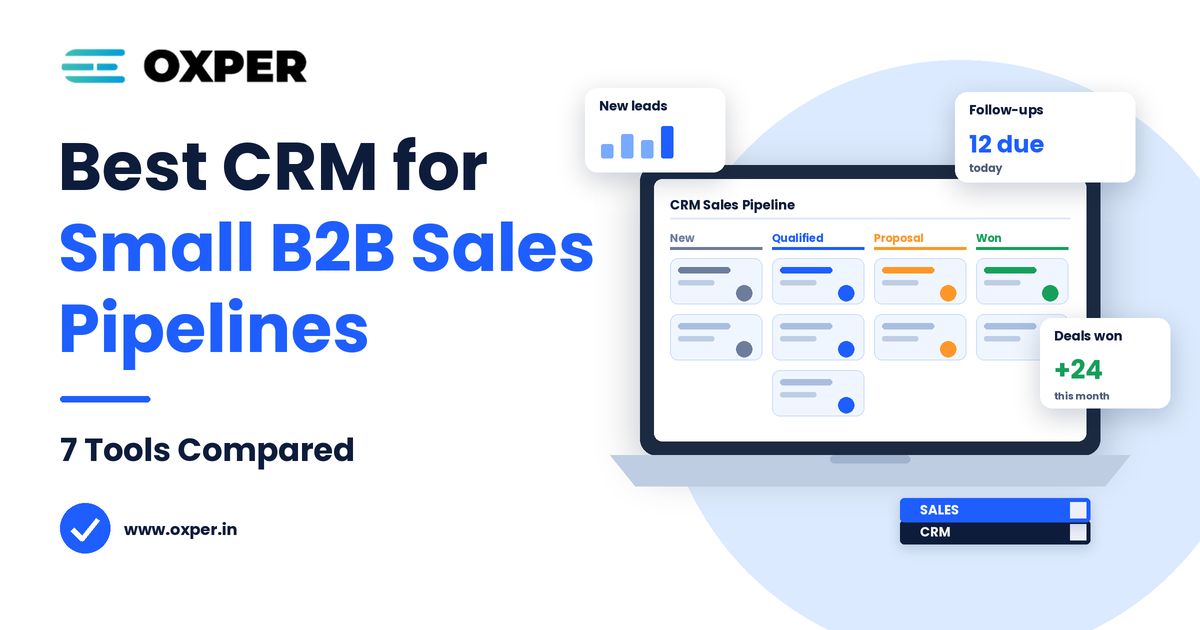
The best CRM for small B2B sales pipeline management is the one that stops deals from slipping. A small B2B team rarely loses a deal because of a weak pitch. It loses it because a follow-up slipped, nobody owned the next step, or a proposal sat untouched for three weeks.
A CRM solves this by providing a single shared record for each account, contact and opportunity. This comparison evaluates seven tools using vendor pricing pages verified in November 2026, then explains the costs and adoption challenges most roundups miss.
What Is the Best CRM for Small B2B Sales Pipeline Management?
No single CRM solution is guaranteed to work for your small B2B sales pipeline – the ideal system is determined by your team’s sales approach. What is your sales motion? Match that first:
- Sales-led pipeline: Pipedrive
- Inbound, marketing-led selling: Hub Spot
- Limited budget with options to personalise: Zoho CRM
- Phone-heavy outbound: Close
- Calls and email built in at a low entry price: Freshsales
- Less manual data entry: Salesflare
- Planning to expand onto a larger platform: Salesforce Starter
If you have a motion in mind, compare costs at the plan you will truly be utilizing.
What Should a CRM for Small B2B Businesses Do?
Dont bother with long feature lists. Your CRM for small B2B businesses should connect a number of contacts to an account and deal since most purchasing decisions are made by more than one person. It should also give you the ability to customise your stages of your pipeline and have a next step prior to a deal’s movement.
In addition, solid B2B CRM software is capable of assigning deal owners and tasks to follow up, synching email and calendar to track leads, and documenting the reason deals were lost. Automation of reminders and stage-based tasks is helpful. The top B2B pipeline management software makes the next step clear and reporting can be kept simple initially.
7 CRM Software Choices for Small Sales Teams Compared
All prices are in USD, per user per month, annual billing, from the vendors’ own pages in November 2026. Taxes and regional pricing may differ.
| CRM Tool | Best For | Key Pipeline Features | Main Limitation |
| HubSpot CRM | Inbound, marketing-led B2B teams | Deal pipelines, email tracking, shared data with marketing | Cost and complexity rise on higher tiers |
| Pipedrive | Sales-first teams wanting a visual pipeline | Drag-and-drop stages; email automation from Growth ($39) | Automation sits on higher plans; light on marketing |
| Zoho CRM | Budget-conscious teams | Multiple pipelines, scoring rules and workflows from Standard | Busier interface, more setup |
| Freshsales | Teams wanting phone and email in one tool | Kanban deals, built-in phone and email, basic workflows | Scoring and sequences need Pro ($39) |
| Close | Outbound teams on calls, email and SMS | Calling and sequences tied to deals | Calling and AI usage can add cost |
| Salesforce Starter | Teams expecting to scale | Lead, account and opportunity records, reports | More setup and admin |
| Salesflare | B2B teams that dislike manual entry | Auto-captured emails and meetings, enrichment, sequences | Higher per-seat price, no free plan |
Prices don’t usually tell the full story. Pipedrive’s Lite plan, for example, doesn’t include the automation most teams would want, while Close’s lowest plan supports just one user. Consider that the plan that includes automation to be your actual price.
How to Choose the Right CRM for Your Sales Process
To find the best CRM for small B2B sales pipeline needs, work through these steps before you buy:
- Write your stages, one per actual change in the buyer’s journey. For most small teams, New Lead, Qualified, Discovery, Proposal, Negotiation and Won or Lost will be sufficient.
- Determine ownership of each step and the length of time a deal can stay in any given step.
- Identified two tools that fit your sales motion.
- Load around 20 real deals into every trial and record a week of activity.
- Choose the one your reps update automatically.
The one with the most features is rarely the tool that wins. It is the tool that your team actually uses.
Hidden CRM Costs Small Teams Should Check
The plan you want isn’t even the least expensive. Pipedrive’s Lite plan is $14 per seat per year, while the Growth plan, which includes email and follow-up automation, costs $39. For five reps that’s $840 a year versus $2,340.
Additional costs are masked beneath the “seat price.” Premium levels on bigger platforms might include onboarding fees, Close bills for calling and AI on top of seat prices. Each additional hire is another full seat, and switching away from spreadsheets takes actual hours of cleanup that don’t appear on a bill.
How a Deal Moves Through a B2B Pipeline
Take a four-rep software vendor and follow one deal:
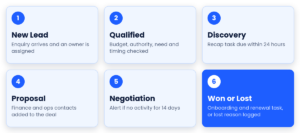
- A prospect submits a website enquiry, and the CRM creates a lead and assigns an owner.
- The rep checks budget, authority, need and timing, then converts the lead into a deal.
- At Discovery, a task is created to send a recap within 24 hours.
- At Proposal, the rep adds finance and operations contacts to the same deal.
- If a deal shows no activity for 14 days, it is flagged as stalled.
- A won deal triggers onboarding and a renewal reminder. A lost deal requires a reason, such as budget or timing.
A weekly review of stuck deals, overdue activities and abandoned reasons helps ensure your pipeline is accurate.
How CRM Connects Marketing, Lead Nurturing and Sales
Deals often stall because marketing and sales define a “qualified lead” differently. Agree on the MQL and SQL criteria first, then pass leads to sales with their source, pages visited and campaign data. That context saves reps from starting every conversation cold.
This is where B2B demand generation becomes measurable, because pipeline can be traced back to the campaigns that created it. Long buying cycles also need nurturing between sales touches, which Oxper covers in its guide to lead nurturing challenges in long sales cycles. If your top of funnel is still taking shape, review B2B digital marketing services for demand generation alongside your CRM setup.
Common CRM Implementation Errors
The biggest mistake is creating too many stages. A fifteen-stage pipeline creates reports that are impossible to interpret, so make sure each stage is still connected to a specific buyer action. Teams can clutter the pipeline by treating every contact as a deal.
There are two additional issues that crops up frequently. One is waiting on a deal that has no next step set to remain sitting in “Proposal” for weeks on end. And the second is for unmanageable spreadsheets that are swept into a new tool without any cleaning or de-duplication, just moving the problem to a different solution. So set one rule: if it’s not in the CRM, then it didn’t happen.
How to Measure CRM and Sales Pipeline Performance
- Stage-to-stage conversion and average days in stage
- Share of open deals with a next step
- Overdue follow-ups
- Win rate and the most common lost reasons
- Share of deals updated weekly, as a sign of adoption
Do not expect revenue gains until your data is reliable, since forecasts built on half-updated records only create false confidence.
Conclusion
The best CRM for a small B2B sales pipeline is the one your team updates daily. Map your stages, shortlist two tools, test them with real deals and price the plan that includes automation. Then connect the CRM to your marketing so leads arrive with context and nothing falls through the gaps.